Building My Own Personal Finance Tracker
How I used Claude Code and Akahu's API to build a self-hosted finance app tailored exactly to my needs
March 2026
Why I built this
I'd been using BudgetBuddie for about two years, and honestly, it's a great app. It's user-friendly, connects to all your NZ banks through Akahu, and makes it really easy to get set up and start tracking your spending. If you're looking for a straightforward budgeting app in New Zealand, I'd genuinely recommend it.
But over time, I found myself wanting to view my data in very specific ways. Things like:
- How much of my income goes to each category? (Not just percentage of expenses)
- Can I build my own levels of grouping for expenses, so I can see both the detail and the big picture?
- How liquid are my assets? What's immediately accessible vs locked in long-term investments?
It wasn't that BudgetBuddie or other personal budget apps were lacking. It was more that I had a very specific need for customization. I wanted to manipulate and view my financial data in my own way, and that's not really what a general-purpose app is designed for.
So I thought: What if I just... built my own?
I had zero experience with web development. I'd never built a web app before. But I had Claude Code, a clear vision of what I needed, and access to Akahu's free Personal App API.
Three weeks later, I had a fully functional finance tracker running on my laptop. Here's how I did it.
The requirements
I started by listing exactly what I needed.
Core features
- Transaction management: Sync from all my NZ bank accounts via Akahu
- Two-level categorization: Detailed categories (Rent, Grocery, Coffee) that roll up into high-level groups (Housing & Utilities, Daily Essentials, Lifestyle)
- Income-based budget view: See spending as percentage of income, not just percentage of expenses
- Cashflow tracking: Monthly income vs expenses breakdown
- Net worth tracking: With assets categorized by liquidity (cash, short-term, long-term investments)
- Export functionality: Get my data out in CSV/Excel whenever I want
- Self-hosted: Run it locally on my laptop. No cloud, no subscription fees
Tech requirements
- Free to run (no monthly fees)
- Works with NZ banks (Akahu integration)
- Simple enough for me to maintain
- Fast enough for daily use
The build process (how Claude Code made this possible)
Here's where it gets interesting. I didn't write most of this code myself.
I used Claude Code, Anthropic's AI coding assistant, to do the heavy lifting. My role was more like a product manager: I defined what I wanted, and Claude Code built it.
Initial setup (Weekend 1)
I gave Claude Code a comprehensive prompt describing the entire app: the features, database schema, two-level categorization system, and NZ context (categories like Countdown, Pak'nSave, KiwiSaver). It scaffolded the entire project, set up the database, created the Flask routes, and built a working MVP in about 10 minutes.
Iteration (Weeks 2 and 3)
The MVP worked, but I wanted refinements. "The date range filter needs an Apply button." "Add export to CSV and Excel." "Show spending as percentage of income, not just expenses." "Make the pie chart labels more readable." Each request took 5 to 30 minutes for Claude Code to implement.
Voice-to-text workflow
I use voice-to-text a lot, so I'd dictate rough ideas to Claude (the conversational AI), who'd polish them into structured prompts for Claude Code. Messy spoken thoughts became clear technical specifications.
Who built what
What I actually coded:
- Configuration tweaks (.env file setup)
- Small CSS adjustments for personal preference
- Testing and bug reporting back to Claude Code
What Claude Code built:
- 100% of the Python backend
- 100% of the database schema and migrations
- 95% of the frontend HTML/JS/CSS
- All Chart.js integrations
- Akahu API client and sync logic
- Export functionality
- Demo mode
The result: a production-ready app in about 3 weeks of part-time work, with maybe 5 to 10 hours of actual hands-on time from me.
Key features and how they work
Transaction syncing
Every day at 2 AM, the app automatically syncs new transactions from all my bank accounts via Akahu. I can also manually trigger a "Sync Now" or do a "Full Backfill" to pull historical data. The sync pulls transaction date, amount, description, merchant name, which account it came from, and raw categorization from the bank.
Two-level categorization
This was crucial for me. I wanted detail when I needed it, but a high-level overview for quick insights.
Level 1 (Detailed): Rent, Grocery, Coffee, Gym, Investment, etc.
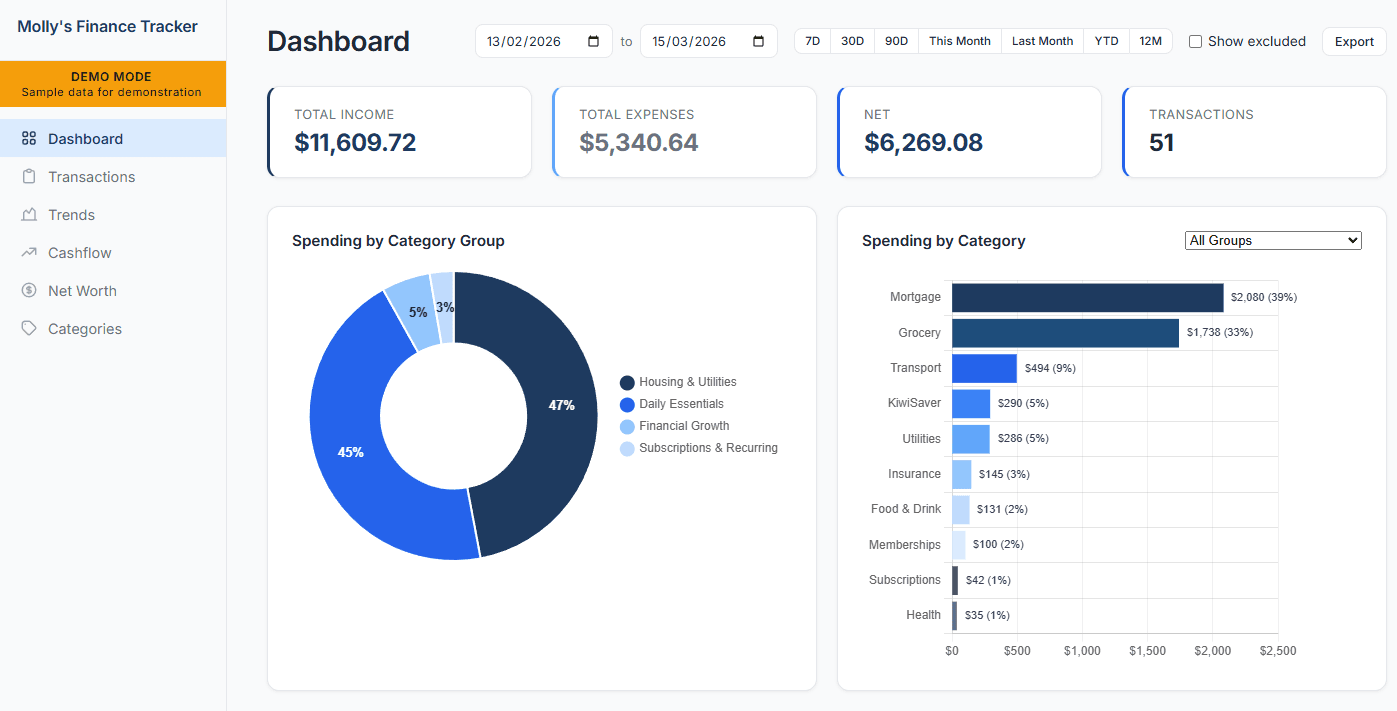
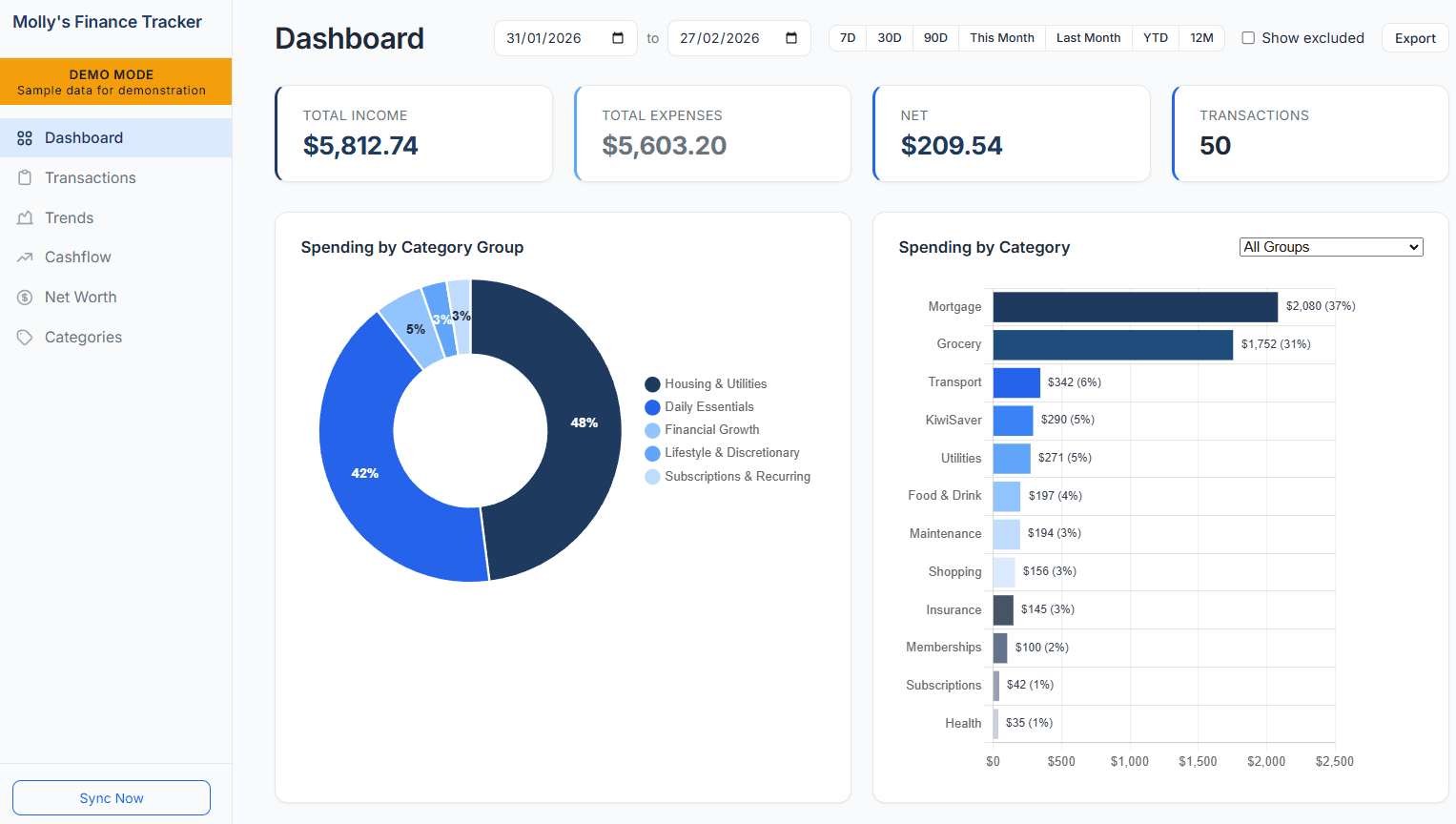
Level 2 (Groups): Housing & Utilities, Daily Essentials, Lifestyle & Discretionary, Financial Growth, Subscriptions & Recurring
Auto-categorization rules match merchant names. "Countdown" goes to Grocery, then Daily Essentials. "AT Transport" goes to Transport, then Daily Essentials. "Spotify" goes to Subscriptions.
Income-based budget view
This is the feature that other personal budget apps were missing. Instead of "Housing is 35% of my expenses," I want to see "Housing is 29% of my income." This provides me with more comprehensive financial insights.
Net worth tracking with asset liquidity
I categorize my accounts by how quickly I can access the money:
- Cash & Cash Equivalents: Everyday and bills accounts (immediately accessible)
- Short-term Investments: Savings account, term deposits (accessible within months)
- Long-term Investments: KiwiSaver, investment portfolios (locked for years)
The Net Worth page shows total assets by liquidity category, liquidity ratio, emergency fund coverage in months, and historical net worth trend.
Export everything
Any data I see, I can export. Transactions, cashflow reports, category breakdowns. CSV or Excel format. I have control over my data.
Here are some snapshots of the tracker:
Running it daily
My routine:
- Check the dashboard every week to stay on top of my spending
- Categorize uncategorized transactions once a week
- Review cashflow monthly
- Export data quarterly for deeper analysis
It takes about 5 to 10 minutes per week total.
See it in action
Here's a quick walkthrough of the app running in demo mode:
What I learned
Technical skills
- How Flask web apps work
- SQL and database design
- API integration (OAuth, REST, rate limiting)
- Basic frontend dev (JavaScript, Chart.js)
Product skills
- Defining requirements clearly
- Iterating based on real usage
- Building for myself first, then demo mode for others
AI-assisted development
- Writing effective prompts for Claude Code
- When to let AI handle everything vs manual tweaks
- Voice-to-text to AI to structured code workflow
Financial literacy
- Income-based vs expense-based budgeting
- Asset liquidity categories
- Understanding which financial data actually matters vs what's just noise
The biggest takeaway for me: using an AI coding assistant allowed me to build a finance tracker that meets my very specific needs. I understand this might not be the "right" way to build software, but it was a great experiment. I enjoy building things, seeing them work, and learning along the way.
Results and reflections
After 3 months of daily use:
- Features I actually wanted (income-based budgeting, liquidity tracking, custom category grouping)
- Complete control over my data
- Learning experience in web development
- Can export and back up anytime
- No vendor lock-in
What I'd do differently: Start with demo mode from day 1 (I added it later). Document the build process as I went (this blog post is retrospective). Set up automated backups earlier.
Would I recommend this approach? If you're someone who has specific needs not met by existing apps, is comfortable with terminal basics, likes owning your data, and enjoys tinkering, then absolutely. The combination of Claude Code, clear requirements, and good APIs like Akahu makes this feasible for non-developers.
If you just want a working app and don't care about customization, BudgetBuddie or PocketSmith are probably better. They're polished, cloud-synced, and mobile-friendly.
For me? Building this was 100% worth it. I now have exactly the finance tracking tool I wanted, and I learned a ton along the way.
Wrapping up
If you have the curiosity and willingness to learn and try things out, building something like this is more achievable than you might think. Here's what helped me:
- A clear idea of what you want
- Access to good APIs (like Akahu for NZ banking)
- An AI coding assistant (like Claude Code)
- Willingness to iterate and learn
The result? A tool that fits exactly how you think about money, with complete data ownership.
Now if you'll excuse me, I need to go categorize this week's transactions.