Building a Lightweight CRM with Notion and Claude Code
How I turned rough meeting notes into a fully structured CRM system using Notion, Claude Code, and a custom skill
February 2026
The problem
As a Customer Success Manager at Brilliant Assessments, I work with a really diverse set of customers. Different industries, different company sizes, different use cases for the product. Every customer has their own context, their own priorities, and their own history with us.
When you're managing multiple accounts without a dedicated CRM, there's a lot to keep track of. What was discussed in the last meeting, what follow-ups are pending, how each customer is feeling about the product. Rather than adopting a big platform, I wanted to build something lightweight around my own workflow.
The idea
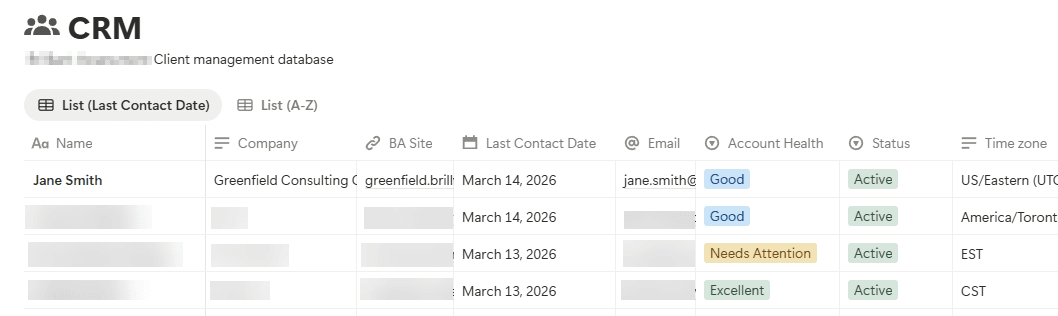
I already use Notion for pretty much everything, so the natural move was to build a CRM directly inside it. I set up a database that tracks the key things I care about for each customer:
- Name, company, and email
- Time zone (important when you're scheduling across regions)
- Status to track where they are in the lifecycle: Trial, Active, or Churned
- Account health as a quick-glance indicator: Excellent, Good, Needs Attention, or At Risk
- Last contact date so I always know when I last touched base
Each customer record also acts as a hub for meeting notes. After every call, I add a sub-page under their record with the date and meeting type, building up a chronological history of every interaction.
The database itself was straightforward. The tedious part was everything that came after each meeting: writing up structured notes, updating the CRM record, making sure the last contact date was current, logging action items. That's the kind of admin work that's easy to skip when you're busy, and it's exactly where things start falling through the cracks.
Making it automatic
This is where Claude Code came in. I built a custom skill that takes my raw meeting notes (rough, informal, shorthand, whatever I jotted down during the call) and turns them into three structured outputs:
Meeting summary
A concise recap with the client name, date, attendees, key discussion points, decisions made, and client sentiment. Everything someone would need to get up to speed quickly.
CRM notes
Context-rich notes designed so that anyone (including future me) can understand the account in minutes. This includes an account health score, what matters to the client, risk signals, and opportunities I should be aware of.
Action items
A table of concrete next steps with owners, due dates, and priority levels, plus a recommended follow-up schedule.
The part that really makes it seamless is the Notion integration. After processing my notes, Claude Code automatically finds the client in my CRM database, creates a new sub-page with the formatted notes, and updates the last contact date. If the client doesn't exist yet, it creates a new CRM entry first.
What it looks like in practice
My workflow now is basically: finish a call, paste my rough notes into Claude Code, and everything else happens automatically. The skill learned from my feedback over time too. Early on, it would ask me to confirm before saving to Notion. I told it to just save directly, and it remembered that preference for future conversations.
On the Notion side, I have a clean dashboard view of all my customers. I can see at a glance who's healthy, who needs attention, when I last spoke to each person, and where they are in their lifecycle. Every meeting note is structured the same way, so finding what was discussed with any customer at any point in time is quick and easy.
Raw Meeting Notes
Rough notes pasted into Claude Code
Claude Code Custom Skill
Processes and structures the notes
Meeting Summary
CRM Notes
Action Items
Notion MCP Integration
Finds or creates client, saves notes, updates CRM
Notion CRM Updated
Structured notes saved, last contact date current
What I learned
The biggest takeaway for me is that you don't always need a dedicated tool for every problem. I could have spent time evaluating CRM platforms, setting up trials, learning new interfaces. Instead, I built something inside a tool I already use every day, and added an automation layer that handles the parts I was most likely to skip.
It also taught me how useful Claude Code's custom skills and memory system are for building repeatable workflows. The skill defines exactly how notes should be processed, the memory stores things like database IDs and my preferences, and the Notion integration handles the actual data entry.
Wrapping up
This whole setup took maybe a couple of hours to put together, and it's saved me way more time than that already. If you're at a small company where a full CRM feels like overkill, or if you're just someone who wants to be more organized about tracking your client interactions, this kind of approach is very doable. You just need Notion (or any structured database you like), Claude Code, and a bit of time to set up the workflow.